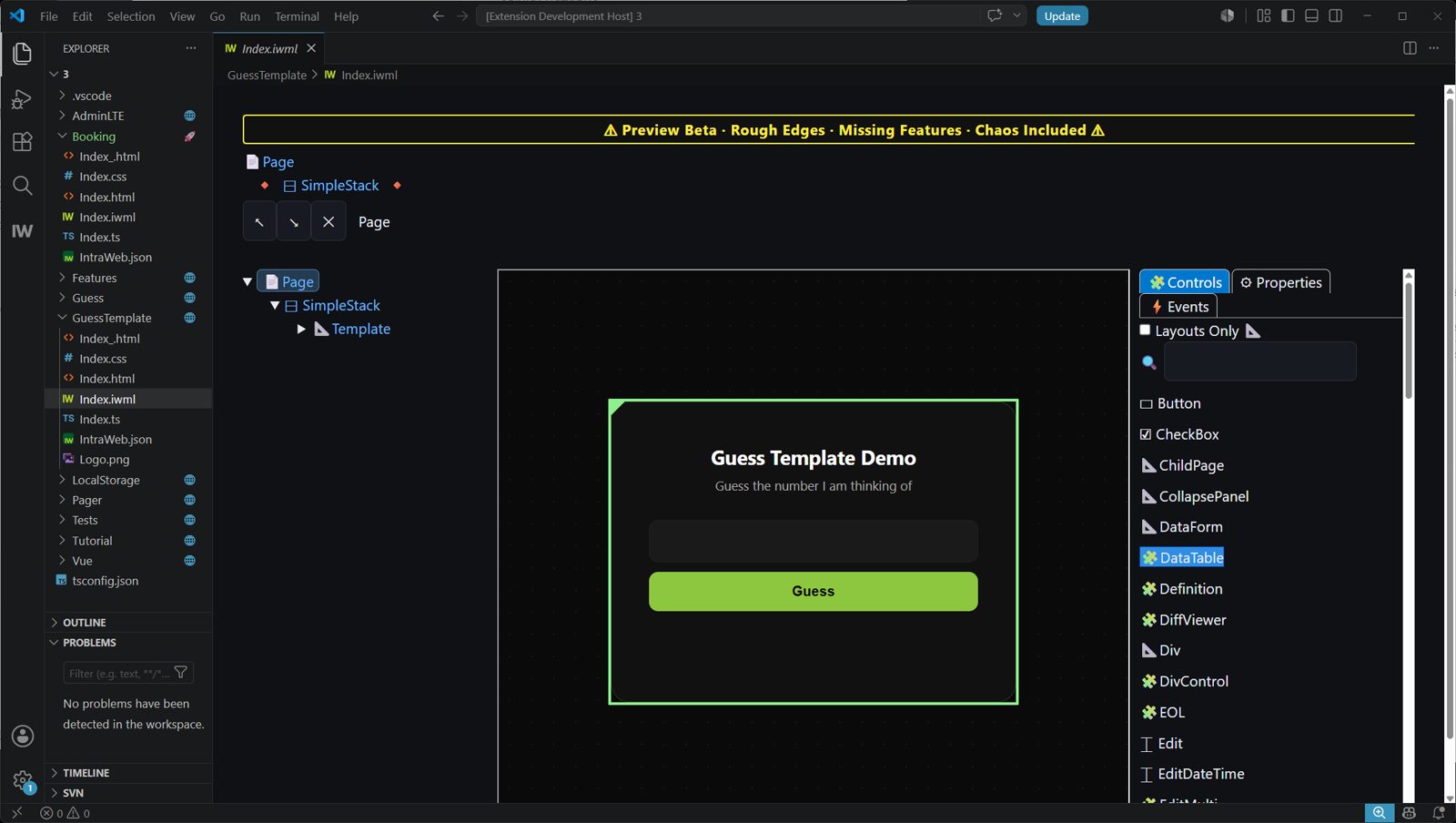
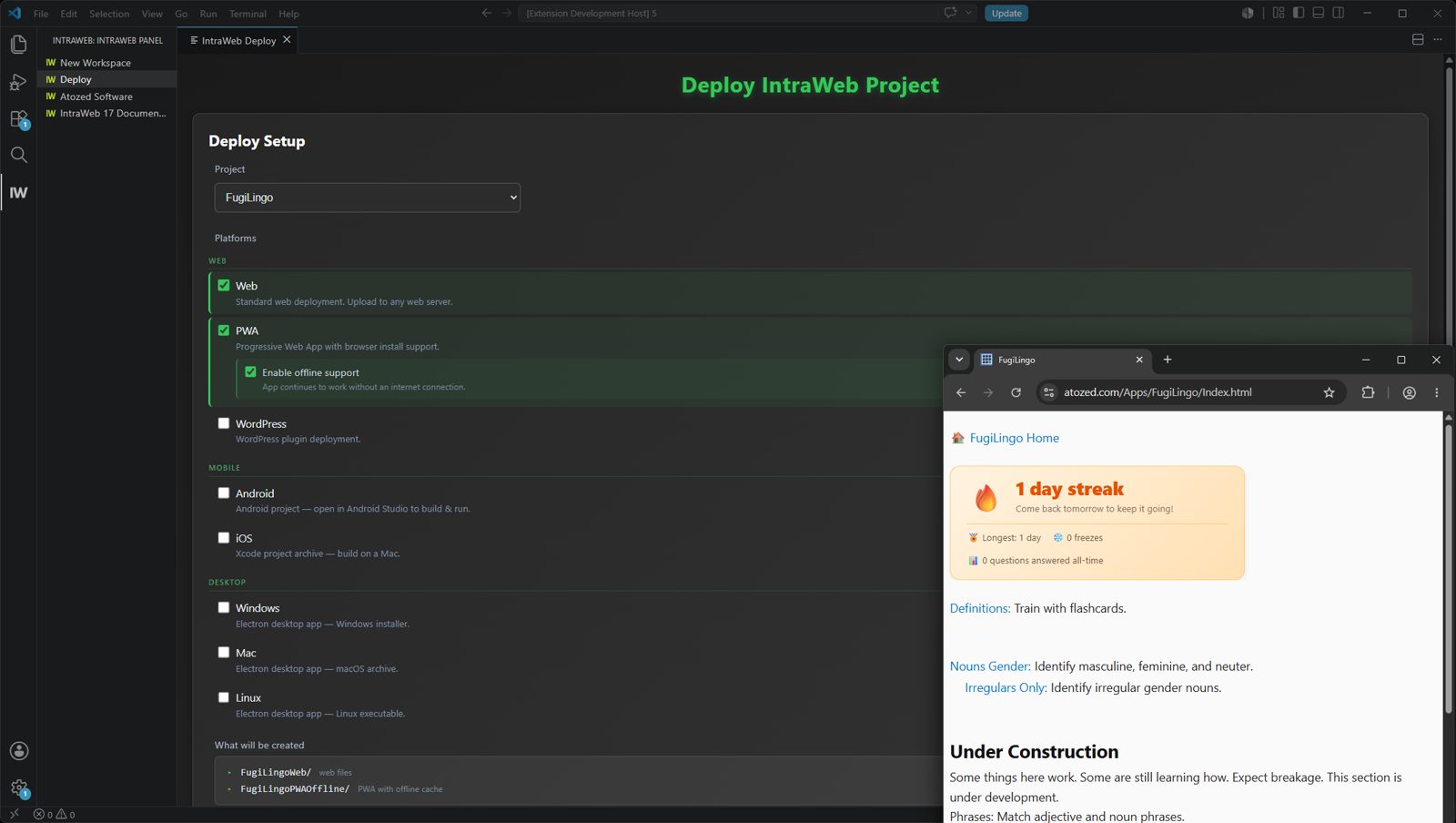
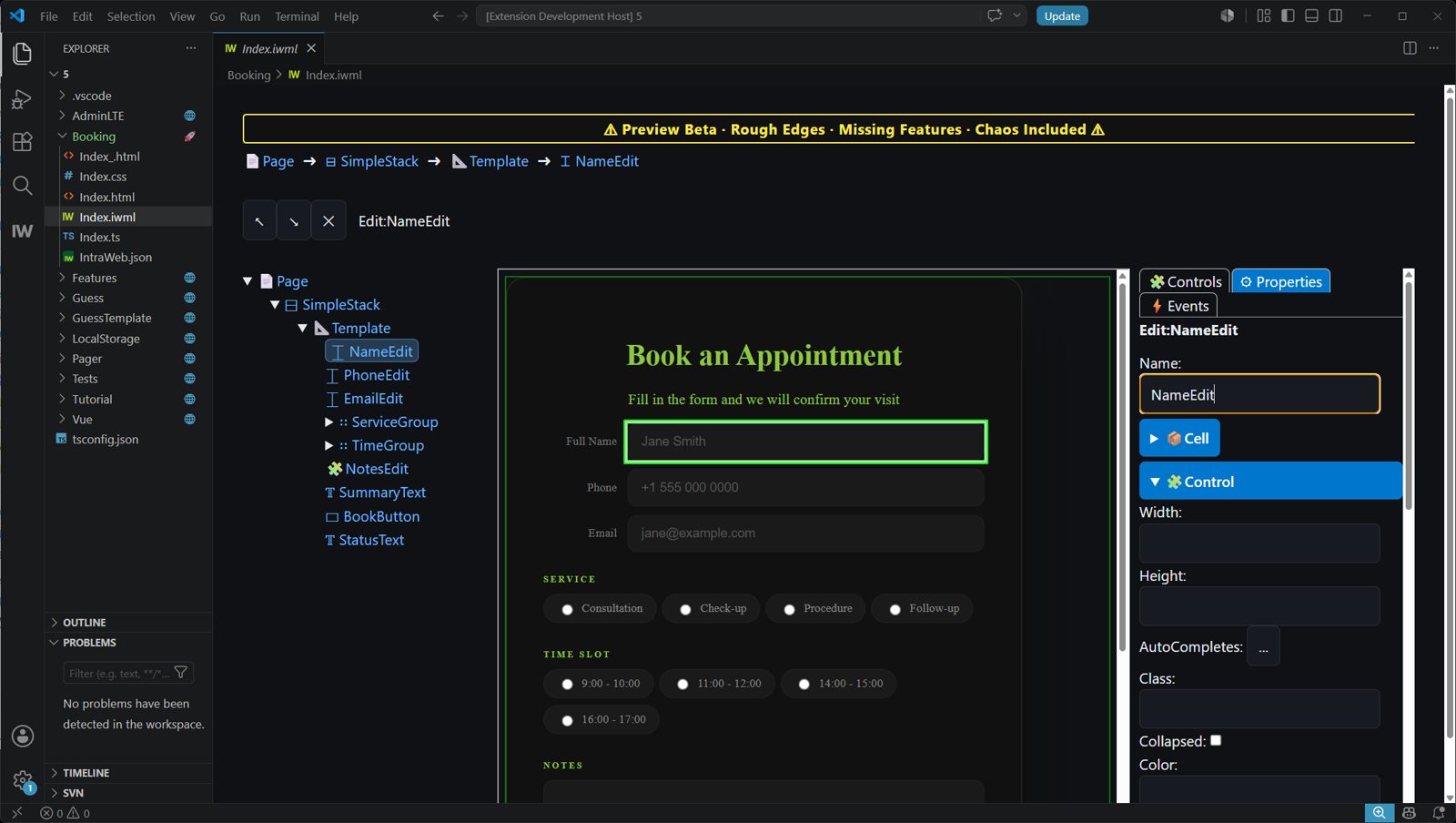
IntraWeb 17 One
Создайте приложение.
Никакой возни с обвязкой
Создайте одно приложение. IntraWeb One сам разделит фронтенд и бэкенд, а затем автоматически свяжет их между собой. Без связующего кода, без API-слоя, без рутины с интеграцией.





ИНСТРУМЕНТАРИЙ
Хватит мучиться с инструментами
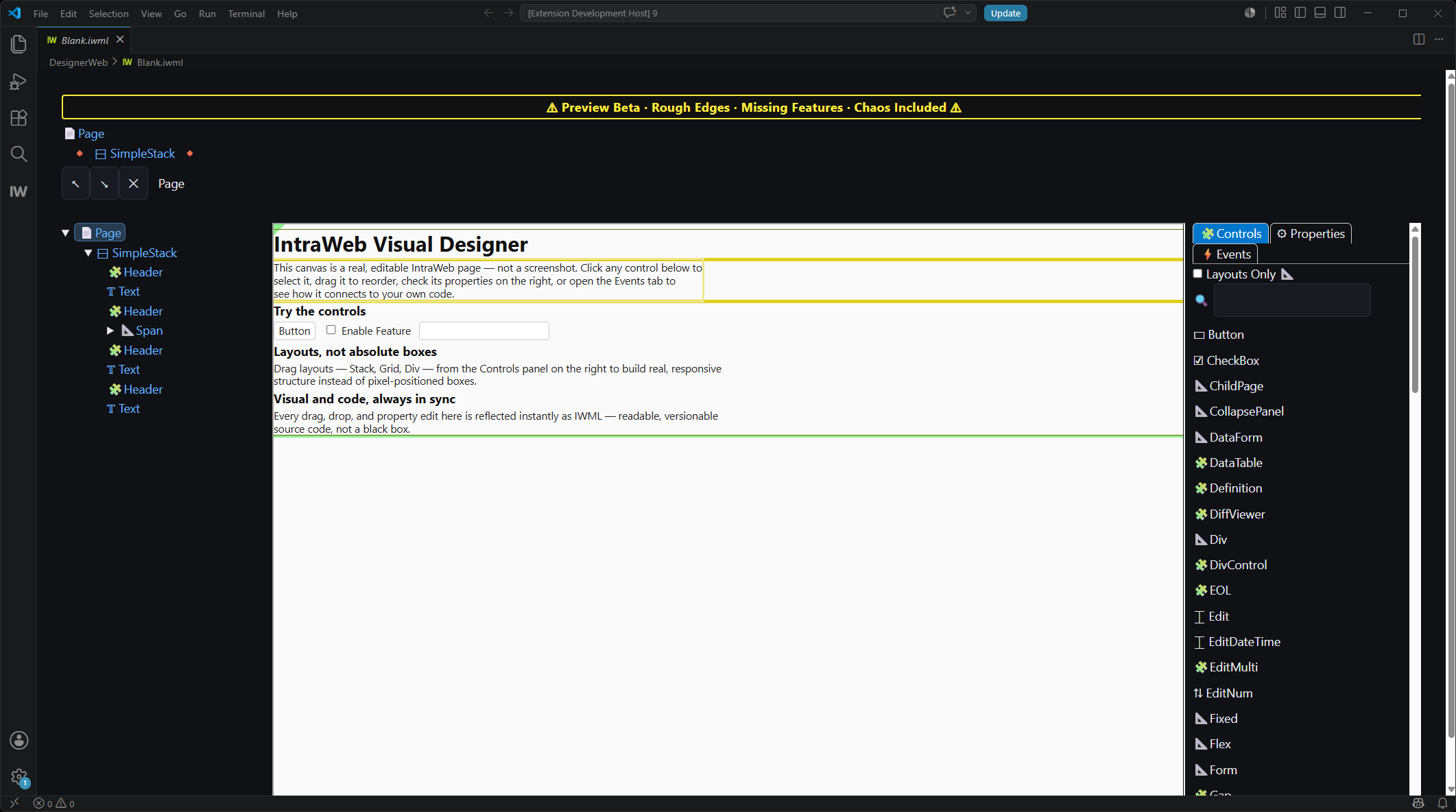
Современная веб-разработка начинается с деревьев зависимостей, конвейеров сборки и целой горы чужого кода. IntraWeb 17 FE убирает весь этот балласт, чтобы проект начинался с вашего приложения.
- Работает прямо в профессиональной среде — VS Code, с глубокой интеграцией
- Работайте полностью офлайн — без привязки к облаку
- Полноценная нативная отладка — без плясок с sourcemap
- GIT / SVN работают именно так, как вы привыкли
- Это не хостинг и не SaaS: каждый байт результата — ваш
ИНСТРУМЕНТАРИЙ
Хватит мучиться с инструментами
Современная веб-разработка начинается с деревьев зависимостей, конвейеров сборки и целой горы чужого кода. IntraWeb 17 FE убирает весь этот балласт, чтобы проект начинался с вашего приложения.
- Работает прямо в профессиональной среде — VS Code, с глубокой интеграцией
- Работайте полностью офлайн — без привязки к облаку
- Полноценная нативная отладка — без плясок с sourcemap
- GIT / SVN работают именно так, как вы привыкли
- Это не хостинг и не SaaS: каждый байт результата — ваш
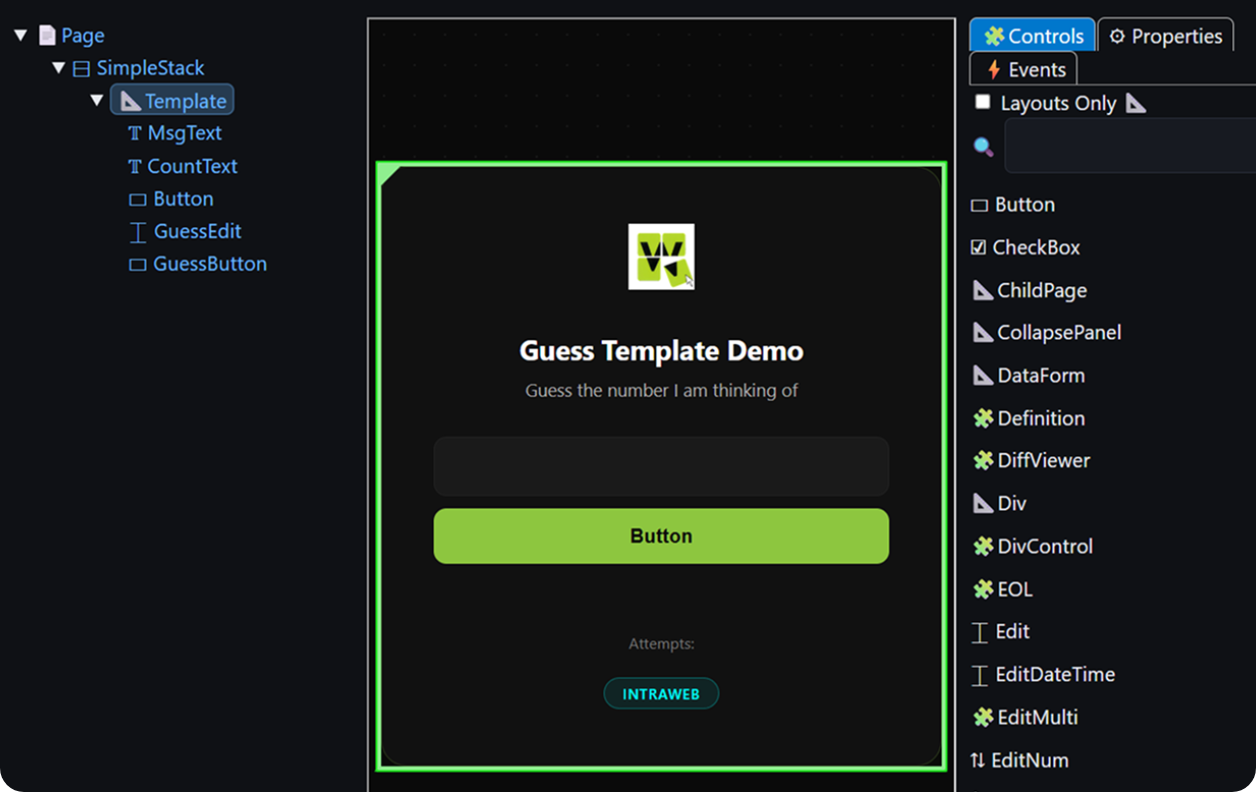
Убедитесь сами
Чем он отличается от привычных решений
namespace GuessTemplate {
  export class Index extends IndexGen {
    public Count = 0;
    // Must init to a value so it has a type and exists.
    public Guess = NaN;
    public Msg = '';
    protected MagicNo = Math.floor((Math.random() * 100)+ 1);

    public WhenPageLoaded(): void {
      const xMagicNo = this.Page.WebParam('MagicNo');
      if (xMagicNo)this.MagicNo = parseInt(xMagicNo);
    }

    public WhenGuessButtonClicked(e: MouseEvent): void {
      if (e && e.shiftKey){
        IntraWeb.Dialogs.ShowMessage('The magic number is: ' + this.MagicNo);
        return;
      }

      this.Msg = '';
      if (isNaN(this.Guess)) {
        // Need to retrieve value from Edit itself when its an invalid number.
        this.Msg = this.GuessEdit.Text.Value + ' is not a valid number.';
      }else if (this.Guess < 1 || this.Guess > 100) {
        this.Msg = this.Guess + ' is not in the range of 1 to 100.';
      }else {
        this.Count++;

        if (this.Guess < this.MagicNo) {
          this.Msg = this.Guess + ' is too low.';
        }else if (this.Guess > this.MagicNo) {
          this.Msg = this.Guess + ' is too high.';
        }else if (this.Guess === this.MagicNo) {
          IntraWeb.Dialogs.ShowMessage('Congratulations! You guessed the magic number.');
          this.GuessButton.Enabled.Value = false;
        }
      }

      this.GuessEdit.Focus();
      this.Guess = NaN;
    }
  }
}import { useState, useRef, useEffect } from 'react'
const logo = '/Logo.png'
function App() {
const [guess, setGuess] = useState('')
const [msg, setMsg] = useState('')
const [count, setCount] = useState(0)
const [disabled, setDisabled] = useState(false)
const magicNo = useRef(Math.floor(Math.random() * 100) + 1)
const inputRef = useRef(null)
useEffect(() => {
const params = new URLSearchParams(window.location.search)
const magic = params.get('MagicNo')
if (magic) magicNo.current = parseInt(magic)
inputRef.current?.focus()
}, [])
function handleGuess(e) {
if (e && e.shiftKey) {
alert('The magic number is: ' + magicNo.current)
return
}
const num = parseInt(guess)
if (isNaN(num)) {
setMsg(guess + ' is not a valid number.')
} else if (num < 1 || num > 100) {
setMsg(num + ' is not in the range of 1 to 100.')
} else {
setCount(c => c + 1)
if (num < magicNo.current) {
setMsg(num + ' is too low.')
} else if (num > magicNo.current) {
setMsg(num + ' is too high.')
} else {
alert('Congratulations! You guessed the magic number.')
setMsg('')
setDisabled(true)
}
}
setGuess('')
inputRef.current?.focus()
}
function handleKeyDown(e) {
if (e.key === 'Enter' && !disabled) {
handleGuess(e)
}
}
return (
<div className="Card">
<div className="Logo">
<img src={logo} alt="Logo" />
</div>
<h1>Guess the Number</h1>
<p>I'm thinking of a number between 1 and 100. Can you guess it?</p>
<div className="Input">
<input
ref={inputRef}
type="number"
placeholder="Enter your guess..."
value={guess}
onChange={e => setGuess(e.target.value)}
onKeyDown={handleKeyDown}
disabled={disabled}
/>
</div>
<div className="Button">
<button onClick={handleGuess} disabled={disabled}>
Guess
</button>
</div>
<div className="Msg">{msg}</div>
{count > 0 && <div className="Counter">Attempts: {count}</div>}
<div className="FrameworkBadge">React</div>
</div>
)
}
export default Appnamespace GuessTemplate {
export class Index extends IndexGen {
public Count = 0;
// Must init to a value so it has a type and exists.
public Guess = NaN;
public Msg = '';
protected MagicNo = Math.floor((Math.random() * 100)+ 1);
public WhenPageLoaded(): void {
const xMagicNo = this.Page.WebParam('MagicNo');
if (xMagicNo)this.MagicNo = parseInt(xMagicNo);
}
public WhenGuessButtonClicked(e: MouseEvent): void {
if (e && e.shiftKey){
IntraWeb.Dialogs.ShowMessage('The magic number is: ' + this.MagicNo);
return;
}
this.Msg = '';
if (isNaN(this.Guess)) {
// Need to retrieve value from Edit itself when its an invalid number.
this.Msg = this.GuessEdit.Text.Value + ' is not a valid number.';
}else if (this.Guess < 1 || this.Guess > 100) {
this.Msg = this.Guess + ' is not in the range of 1 to 100.';
}else {
this.Count++;
if (this.Guess < this.MagicNo) {
this.Msg = this.Guess + ' is too low.';
}else if (this.Guess > this.MagicNo) {
this.Msg = this.Guess + ' is too high.';
}else if (this.Guess === this.MagicNo) {
IntraWeb.Dialogs.ShowMessage('Congratulations! You guessed the magic number.');
this.GuessButton.Enabled.Value = false;
}
}
this.GuessEdit.Focus();
this.Guess = NaN;
}
}
}<template>
<div class="Card">
<div class="Logo">
<img src="/Logo.png" alt="Logo" />
</div>
<h1>Guess the Number</h1>
<p>I'm thinking of a number between 1 and 100. Can you guess it?</p>
<div class="Input">
<input
ref="inputRef"
v-model="guess"
type="number"
placeholder="Enter your guess..."
:disabled="disabled"
@keydown.enter="handleGuess"
/>
</div>
<div class="Button">
<button @click="handleGuess" :disabled="disabled">Guess</button>
</div>
<div class="Msg">{{ msg }}</div>
<div v-if="count > 0" class="Counter">Attempts: {{ count }}</div>
<div class="FrameworkBadge">Vue</div>
</div>
</template>
<script setup>
import { ref, onMounted } from 'vue'
const guess = ref('')
const msg = ref('')
const count = ref(0)
const disabled = ref(false)
const inputRef = ref(null)
const params = new URLSearchParams(window.location.search)
const magicNo = params.get('MagicNo')
? parseInt(params.get('MagicNo'))
: Math.floor(Math.random() * 100) + 1
onMounted(() => {
inputRef.value?.focus()
})
function handleGuess(e) {
if (e?.shiftKey) {
alert('The magic number is: ' + magicNo)
return
}
const num = parseInt(guess.value)
if (isNaN(num)) {
msg.value = guess.value + ' is not a valid number.'
} else if (num < 1 || num > 100) {
msg.value = num + ' is not in the range of 1 to 100.'
} else {
count.value++
if (num < magicNo) {
msg.value = num + ' is too low.'
} else if (num > magicNo) {
msg.value = num + ' is too high.'
} else {
alert('Congratulations! You guessed the magic number.')
msg.value = ''
disabled.value = true
}
}
guess.value = ''
inputRef.value?.focus()
}
</script>namespace GuessTemplate {
export class Index extends IndexGen {
public Count = 0;
// Must init to a value so it has a type and exists.
public Guess = NaN;
public Msg = '';
protected MagicNo = Math.floor((Math.random() * 100)+ 1);
public WhenPageLoaded(): void {
const xMagicNo = this.Page.WebParam('MagicNo');
if (xMagicNo)this.MagicNo = parseInt(xMagicNo);
}
public WhenGuessButtonClicked(e: MouseEvent): void {
if (e && e.shiftKey){
IntraWeb.Dialogs.ShowMessage('The magic number is: ' + this.MagicNo);
return;
}
this.Msg = '';
if (isNaN(this.Guess)) {
// Need to retrieve value from Edit itself when its an invalid number.
this.Msg = this.GuessEdit.Text.Value + ' is not a valid number.';
}else if (this.Guess < 1 || this.Guess > 100) {
this.Msg = this.Guess + ' is not in the range of 1 to 100.';
}else {
this.Count++;
if (this.Guess < this.MagicNo) {
this.Msg = this.Guess + ' is too low.';
}else if (this.Guess > this.MagicNo) {
this.Msg = this.Guess + ' is too high.';
}else if (this.Guess === this.MagicNo) {
IntraWeb.Dialogs.ShowMessage('Congratulations! You guessed the magic number.');
this.GuessButton.Enabled.Value = false;
}
}
this.GuessEdit.Focus();
this.Guess = NaN;
}
}
}// app.html
<div class="Card">
<div class="Logo">
<img src="Logo.png" alt="Logo" />
</div>
<h1>Guess the Number</h1>
<p>I'm thinking of a number between 1 and 100. Can you guess it?</p>
<div class="Input">
<input
#inputRef
[ngModel]="guess()"
(ngModelChange)="guess.set($event)"
type="number"
placeholder="Enter your guess..."
[disabled]="disabled()"
(keydown.enter)="handleGuess($event)"
/>
</div>
<div class="Button">
<button (click)="handleGuess($event)" [disabled]="disabled()">Guess</button>
</div>
<div class="Msg">{{ msg() }}</div>
@if (count() > 0) {
<div class="Counter">Attempts: {{ count() }}</div>
}
<div class="FrameworkBadge">Angular</div>
</div>
// app.ts
import { Component, signal, ViewChild, ElementRef, AfterViewInit } from '@angular/core';
import { FormsModule } from '@angular/forms';
@Component({
selector: 'app-root',
imports: [FormsModule],
templateUrl: './app.html',
styleUrl: './app.scss'
})
export class App implements AfterViewInit {
@ViewChild('inputRef') inputRef!: ElementRef<HTMLInputElement>;
readonly guess = signal('');
readonly msg = signal('');
readonly count = signal(0);
readonly disabled = signal(false);
private readonly magicNo: number;
constructor() {
const params = new URLSearchParams(window.location.search);
const fromQuery = params.get('MagicNo');
this.magicNo = fromQuery
? parseInt(fromQuery, 10)
: Math.floor(Math.random() * 100) + 1;
}
ngAfterViewInit(): void {
this.inputRef.nativeElement.focus();
}
handleGuess(event?: Event): void {
if ((event as KeyboardEvent | MouseEvent | undefined)?.shiftKey) {
alert('The magic number is: ' + this.magicNo);
return;
}
const raw = this.guess();
const num = parseInt(raw, 10);
if (isNaN(num)) {
this.msg.set(raw + ' is not a valid number.');
} else if (num < 1 || num > 100) {
this.msg.set(num + ' is not in the range of 1 to 100.');
} else {
this.count.update(c => c + 1);
if (num < this.magicNo) {
this.msg.set(num + ' is too low.');
} else if (num > this.magicNo) {
this.msg.set(num + ' is too high.');
} else {
alert('Congratulations! You guessed the magic number.');
this.msg.set('');
this.disabled.set(true);
}
}
this.guess.set('');
this.inputRef.nativeElement.focus();
}
}

Блоки
«Произвольный HTML»
для WordPress
Один из самых наглядных способов встроить IntraWeb в готовый сайт на WordPress: создайте блок в IntraWeb, опубликуйте сгенерированные файлы и разместите приложение в WordPress через встроенный блок «Произвольный HTML».
От дизайнера IntraWeb до живой страницы WordPress
Создайте блок визуально, опубликуйте сгенерированные файлы и встройте работающее приложение IntraWeb в WordPress через штатный блок «Произвольный HTML».
Покажем на примере раздела бронированияСоздайте и опубликуйте блок IntraWeb
Соберите интерфейс визуально в дизайнере IntraWeb, затем опубликуйте на сервере сгенерированные файлы HTML, CSS, JavaScript и конфигурации. В нашем примере блок — это форма бронирования, которая умеет сохранять отправленные данные.
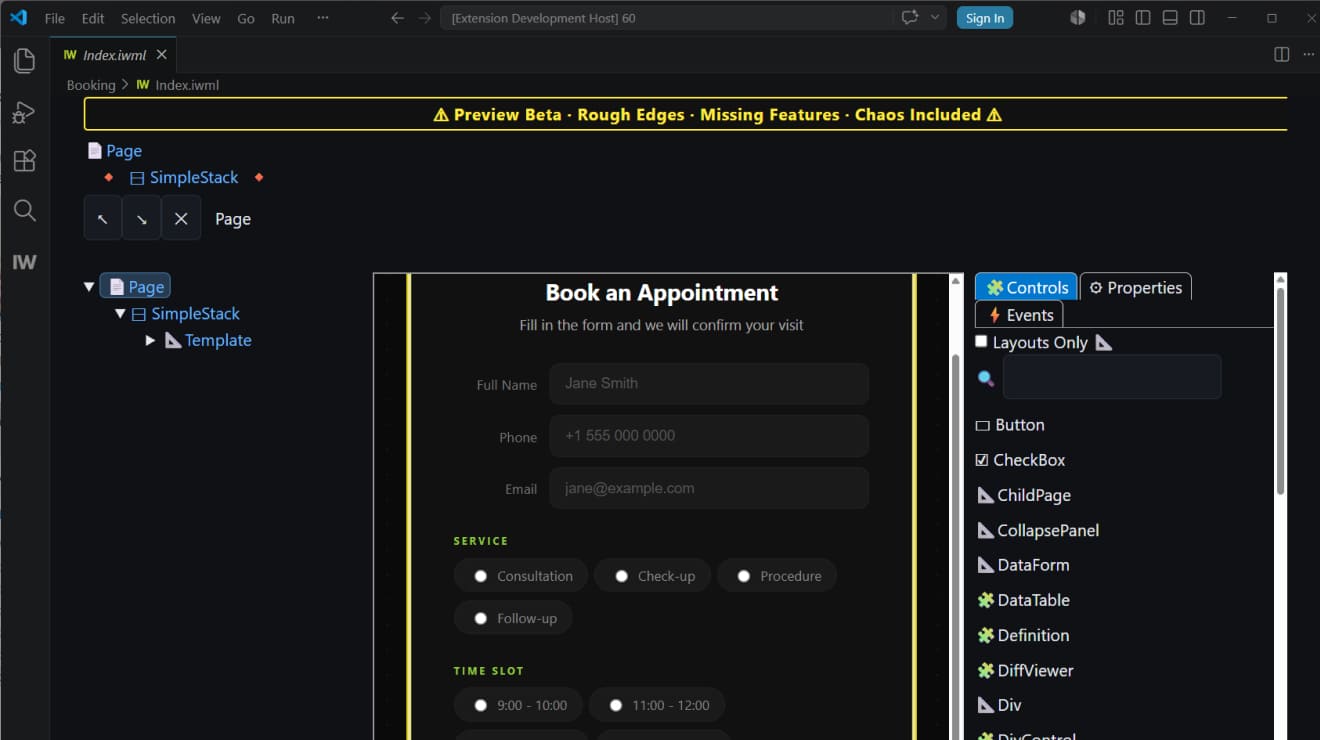 Дизайнер IntraWeb
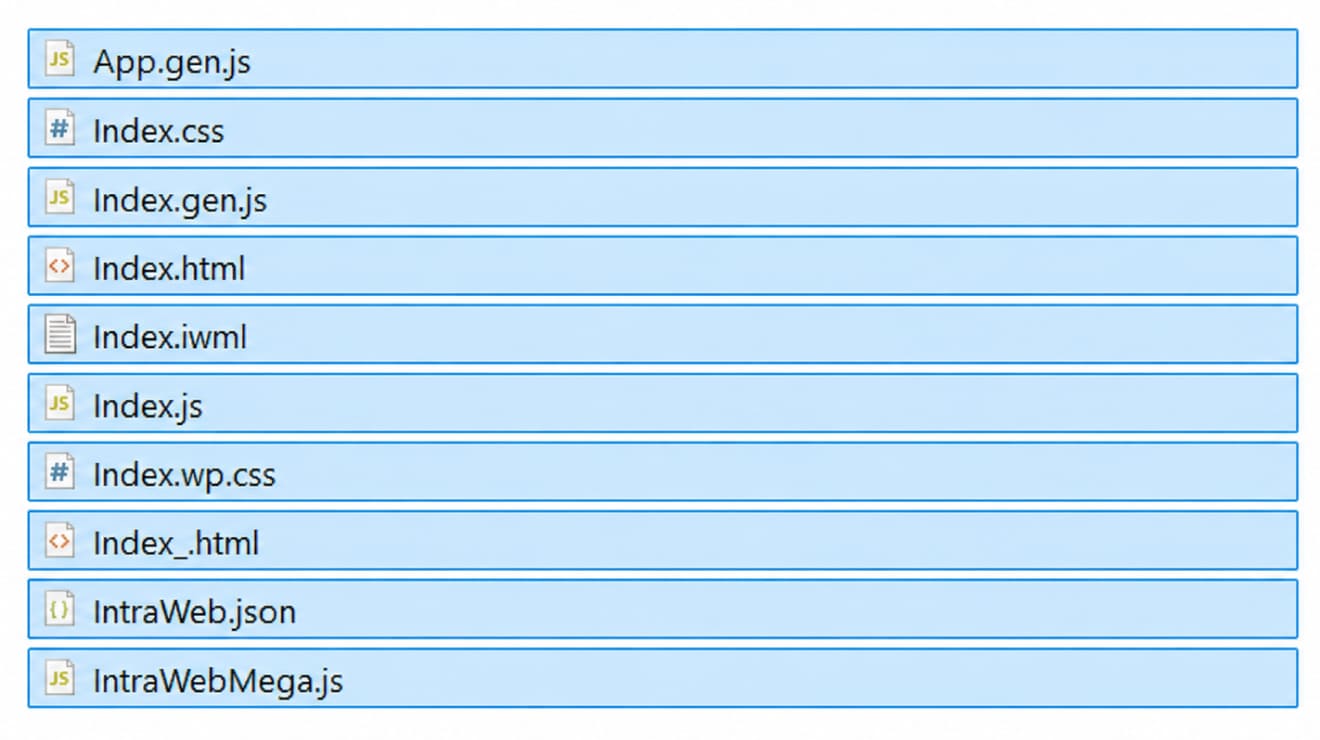 Опубликованные файлы проекта
Добавьте «Произвольный HTML» и подключите приложение
В WordPress добавьте встроенный блок «Произвольный HTML» ровно там, где должно появиться приложение IntraWeb. Затем вставьте небольшой фрагмент кода, который подгружает опубликованное приложение.
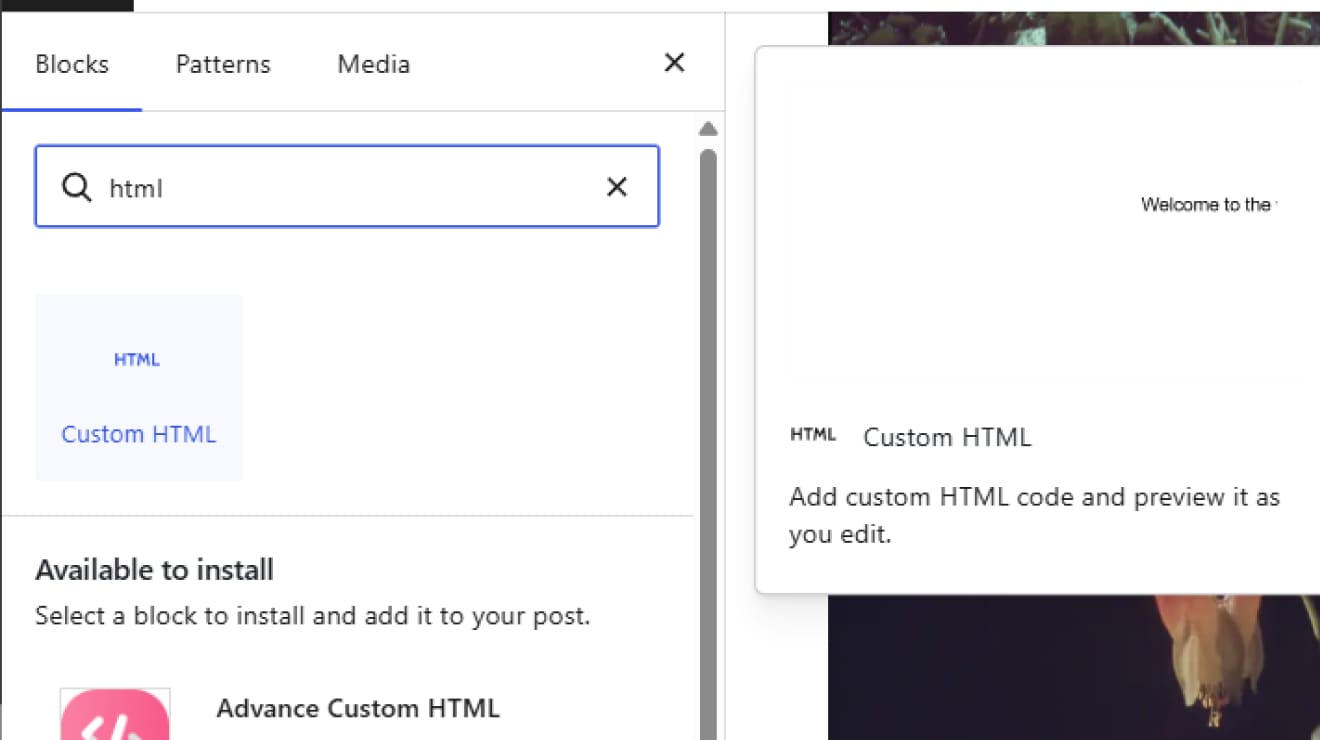 Произвольный HTML в WordPress
 Подключите блок
Форма IntraWeb работает прямо в WordPress
Форма отображается на странице как обычный раздел WordPress. Макетом страницы управляет WordPress, а IntraWeb хранит логику приложения отдельно — чистой и под полным контролем разработчика.

Более трёх десятилетий практической веб-инженерии — от первых коммерческих инструментов до IntraWeb сегодня
Atozed Software: Тот самый пионер веба
Мы были здесь ещё до того,
как веб стал «модным»
В 1994 году браузеры были примитивными, а JavaScript ещё не существовало. Пока мир разбирался с модемным доступом, Chad Z. уже выпускал первые в мире коммерческие инструменты для веб-разработки. До ASP, до PHP и до войн фреймворков мы уже связывали бизнес-логику с интернетом.
Internet Application
Gateway
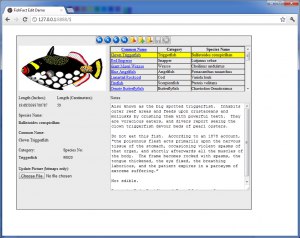
Этот зернистый скриншот — кусочек истории. На нём рождение Internet Application Gateway (IAG), предшественника IntraWeb. В те времена большинство динамических систем были «сырым» кодом, который выплёвывал строки HTML, а IAG служил шлюзом между бизнес-логикой и HTTP.
Более 30 лет инженерных традиций
От IAG в середине 90-х и Web Solution Builder в 1996 году до сегодняшнего IntraWeb — наша история это непрерывная линия инженерной дисциплины. Мы не гонимся за трендами, потому что понимаем основы.
Более трёх десятилетий практической веб-инженерии — от первых коммерческих инструментов до IntraWeb сегодня
Atozed Software: Тот самый пионер веба
Мы были здесь ещё до того, как веб стал «модным»
В 1994 году браузеры были примитивными, а JavaScript ещё не существовало. Пока мир разбирался с модемным доступом, Chad Z. уже выпускал первые в мире коммерческие инструменты для веб-разработки. До ASP, до PHP и до войн фреймворков мы уже связывали бизнес-логику с интернетом.
Internet Application Gateway
Этот зернистый скриншот — кусочек истории. На нём рождение Internet Application Gateway (IAG), предшественника IntraWeb. В те времена большинство динамических систем были «сырым» кодом, который выплёвывал строки HTML, а IAG служил шлюзом между бизнес-логикой и HTTP.
Более 30 лет инженерных традиций
От IAG в середине 90-х и Web Solution Builder в 1996 году до сегодняшнего IntraWeb — наша история это непрерывная линия инженерной дисциплины.
Станьте одним из первых, кто строит так.
Присоединяйтесь к бета-тесту IntraWeb 17 FE. Прямой контакт с командой инженеров. Бесплатная лицензия Studio на первый год после релиза. Честные отзывы, без NDA.
или просто
Присоединяйтесь к нашему каналу в Telegram