IntraWeb 17 One
构建应用。
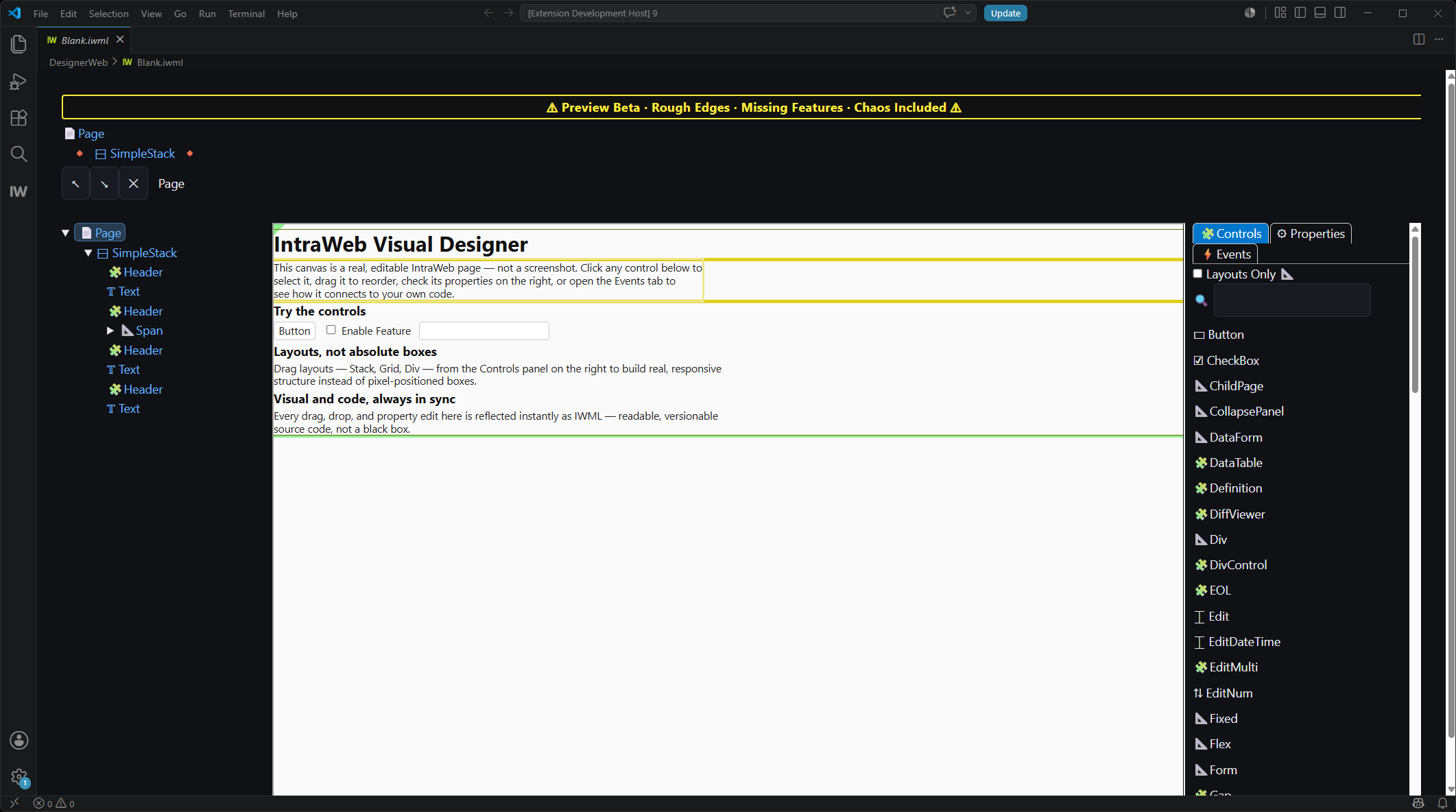
告别胶水式开发
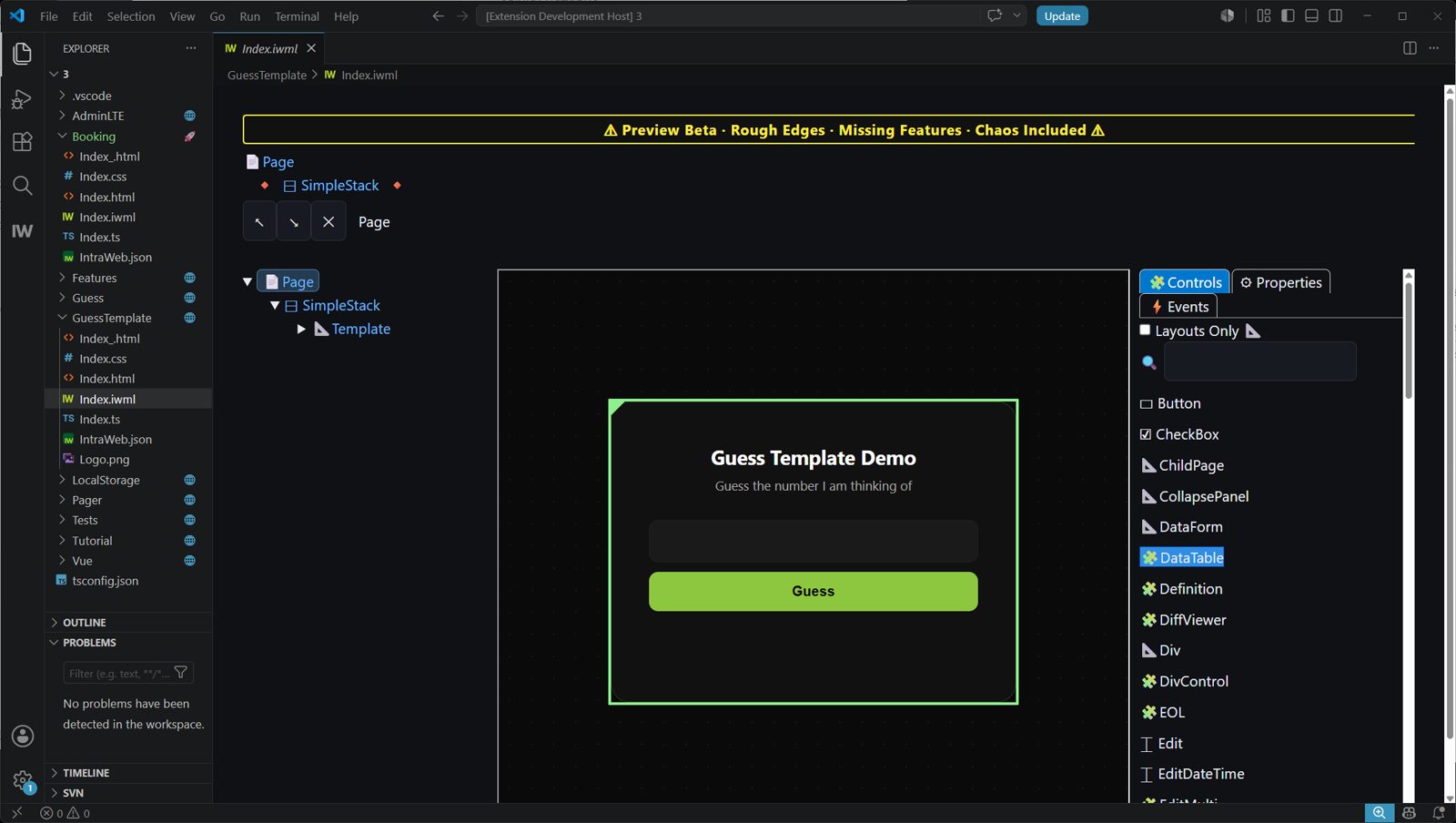
只需创建一个应用。IntraWeb One 会为你拆分前端与后端,并自动把两者连起来。不用胶水代码,不用 API 层,也不用做繁琐的集成工作。





工具链
告别 工具链 疲劳
如今的 Web 开发,一开始面对的就是依赖树、构建流水线,外加一座由别人的代码堆成的小山。IntraWeb 17 FE 砍掉这些冗余,让项目从你的应用本身开始。
- 深度集成在专业开发环境 VS Code 之中
- 100% 离线开发,不依赖云端
- 专业的原生调试,无需折腾 sourcemap
- GIT / SVN 版本控制,用起来和你预期的一模一样
- 不是托管,也不是 SaaS,输出的每个字节都归你
工具链
告别 工具链 疲劳
如今的 Web 开发,一开始面对的就是依赖树、构建流水线,外加一座由别人的代码堆成的小山。IntraWeb 17 FE 砍掉这些冗余,让项目从你的应用本身开始。
- 深度集成在专业开发环境 VS Code 之中
- 100% 离线开发,不依赖云端
- 专业的原生调试,无需折腾 sourcemap
- GIT / SVN 版本控制,用起来和你预期的一模一样
- 不是托管,也不是 SaaS,输出的每个字节都归你
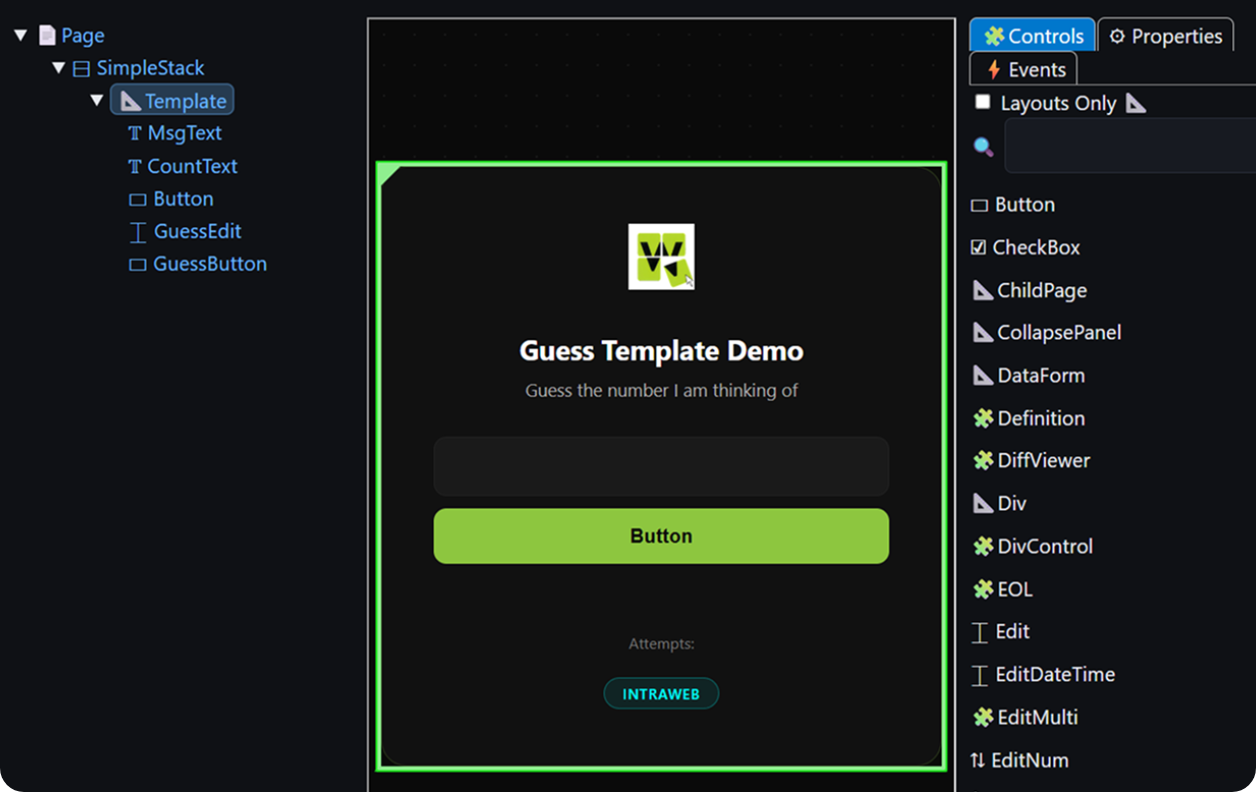
眼见为实
与常见方案有何不同
namespace GuessTemplate {
  export class Index extends IndexGen {
    public Count = 0;
    // Must init to a value so it has a type and exists.
    public 猜 = NaN;
    public Msg = '';
    protected MagicNo = Math.floor((Math.random() * 100)+ 1);

    public WhenPageLoaded(): void {
      const xMagicNo = this.Page.WebParam('MagicNo');
      if (xMagicNo)this.MagicNo = parseInt(xMagicNo);
    }

    public WhenGuessButtonClicked(e: MouseEvent): void {
      if (e && e.shiftKey){
        IntraWeb.Dialogs.ShowMessage('The magic number is: ' + this.MagicNo);
        return;
      }

      this.Msg = '';
      if (isNaN(this.猜)) {
        // Need to retrieve value from Edit itself when its an invalid number.
        this.Msg = this.GuessEdit.Text.Value + ' is not a valid number.';
      }else if (this.猜 < 1 || this.猜 > 100) {
        this.Msg = this.猜 + ' is not in the range of 1 to 100.';
      }else {
        this.Count++;

        if (this.猜 < this.MagicNo) {
          this.Msg = this.猜 + ' is too low.';
        }else if (this.猜 > this.MagicNo) {
          this.Msg = this.猜 + ' is too high.';
        }else if (this.猜 === this.MagicNo) {
          IntraWeb.Dialogs.ShowMessage('Congratulations! You guessed the magic number.');
          this.GuessButton.Enabled.Value = false;
        }
      }

      this.GuessEdit.Focus();
      this.猜 = NaN;
    }
  }
}import { useState, useRef, useEffect } from 'react'
const logo = '/Logo.png'
function App() {
const [guess, setGuess] = useState('')
const [msg, setMsg] = useState('')
const [count, setCount] = useState(0)
const [disabled, setDisabled] = useState(false)
const magicNo = useRef(Math.floor(Math.random() * 100) + 1)
const inputRef = useRef(null)
useEffect(() => {
const params = new URLSearchParams(window.location.search)
const magic = params.get('MagicNo')
if (magic) magicNo.current = parseInt(magic)
inputRef.current?.focus()
}, [])
function handleGuess(e) {
if (e && e.shiftKey) {
alert('The magic number is: ' + magicNo.current)
return
}
const num = parseInt(guess)
if (isNaN(num)) {
setMsg(guess + ' is not a valid number.')
} else if (num < 1 || num > 100) {
setMsg(num + ' is not in the range of 1 to 100.')
} else {
setCount(c => c + 1)
if (num < magicNo.current) {
setMsg(num + ' is too low.')
} else if (num > magicNo.current) {
setMsg(num + ' is too high.')
} else {
alert('Congratulations! You guessed the magic number.')
setMsg('')
setDisabled(true)
}
}
setGuess('')
inputRef.current?.focus()
}
function handleKeyDown(e) {
if (e.key === 'Enter' && !disabled) {
handleGuess(e)
}
}
return (
<div className="Card">
<div className="Logo">
<img src={logo} alt="Logo" />
</div>
<h1>猜 the Number</h1>
<p>I'm thinking of a number between 1 and 100. Can you guess it?</p>
<div className="Input">
<input
ref={inputRef}
type="number"
placeholder="Enter your guess..."
value={guess}
onChange={e => setGuess(e.target.value)}
onKeyDown={handleKeyDown}
disabled={disabled}
/>
</div>
<div className="Button">
<button onClick={handleGuess} disabled={disabled}>
猜
</button>
</div>
<div className="Msg">{msg}</div>
{count > 0 && <div className="Counter">Attempts: {count}</div>}
<div className="FrameworkBadge">React</div>
</div>
)
}
export default Appnamespace GuessTemplate {
export class Index extends IndexGen {
public Count = 0;
// Must init to a value so it has a type and exists.
public 猜 = NaN;
public Msg = '';
protected MagicNo = Math.floor((Math.random() * 100)+ 1);
public WhenPageLoaded(): void {
const xMagicNo = this.Page.WebParam('MagicNo');
if (xMagicNo)this.MagicNo = parseInt(xMagicNo);
}
public WhenGuessButtonClicked(e: MouseEvent): void {
if (e && e.shiftKey){
IntraWeb.Dialogs.ShowMessage('The magic number is: ' + this.MagicNo);
return;
}
this.Msg = '';
if (isNaN(this.猜)) {
// Need to retrieve value from Edit itself when its an invalid number.
this.Msg = this.GuessEdit.Text.Value + ' is not a valid number.';
}else if (this.猜 < 1 || this.猜 > 100) {
this.Msg = this.猜 + ' is not in the range of 1 to 100.';
}else {
this.Count++;
if (this.猜 < this.MagicNo) {
this.Msg = this.猜 + ' is too low.';
}else if (this.猜 > this.MagicNo) {
this.Msg = this.猜 + ' is too high.';
}else if (this.猜 === this.MagicNo) {
IntraWeb.Dialogs.ShowMessage('Congratulations! You guessed the magic number.');
this.GuessButton.Enabled.Value = false;
}
}
this.GuessEdit.Focus();
this.猜 = NaN;
}
}
}<template>
<div class="Card">
<div class="Logo">
<img src="/Logo.png" alt="Logo" />
</div>
<h1>猜 the Number</h1>
<p>I'm thinking of a number between 1 and 100. Can you guess it?</p>
<div class="Input">
<input
ref="inputRef"
v-model="guess"
type="number"
placeholder="Enter your guess..."
:disabled="disabled"
@keydown.enter="handleGuess"
/>
</div>
<div class="Button">
<button @click="handle猜" :disabled="disabled">Guess</button>
</div>
<div class="Msg">{{ msg }}</div>
<div v-if="count > 0" class="Counter">Attempts: {{ count }}</div>
<div class="FrameworkBadge">Vue</div>
</div>
</template>
<script setup>
import { ref, onMounted } from 'vue'
const guess = ref('')
const msg = ref('')
const count = ref(0)
const disabled = ref(false)
const inputRef = ref(null)
const params = new URLSearchParams(window.location.search)
const magicNo = params.get('MagicNo')
? parseInt(params.get('MagicNo'))
: Math.floor(Math.random() * 100) + 1
onMounted(() => {
inputRef.value?.focus()
})
function handleGuess(e) {
if (e?.shiftKey) {
alert('The magic number is: ' + magicNo)
return
}
const num = parseInt(guess.value)
if (isNaN(num)) {
msg.value = guess.value + ' is not a valid number.'
} else if (num < 1 || num > 100) {
msg.value = num + ' is not in the range of 1 to 100.'
} else {
count.value++
if (num < magicNo) {
msg.value = num + ' is too low.'
} else if (num > magicNo) {
msg.value = num + ' is too high.'
} else {
alert('Congratulations! You guessed the magic number.')
msg.value = ''
disabled.value = true
}
}
guess.value = ''
inputRef.value?.focus()
}
</script>namespace GuessTemplate {
export class Index extends IndexGen {
public Count = 0;
// Must init to a value so it has a type and exists.
public 猜 = NaN;
public Msg = '';
protected MagicNo = Math.floor((Math.random() * 100)+ 1);
public WhenPageLoaded(): void {
const xMagicNo = this.Page.WebParam('MagicNo');
if (xMagicNo)this.MagicNo = parseInt(xMagicNo);
}
public WhenGuessButtonClicked(e: MouseEvent): void {
if (e && e.shiftKey){
IntraWeb.Dialogs.ShowMessage('The magic number is: ' + this.MagicNo);
return;
}
this.Msg = '';
if (isNaN(this.猜)) {
// Need to retrieve value from Edit itself when its an invalid number.
this.Msg = this.GuessEdit.Text.Value + ' is not a valid number.';
}else if (this.猜 < 1 || this.猜 > 100) {
this.Msg = this.猜 + ' is not in the range of 1 to 100.';
}else {
this.Count++;
if (this.猜 < this.MagicNo) {
this.Msg = this.猜 + ' is too low.';
}else if (this.猜 > this.MagicNo) {
this.Msg = this.猜 + ' is too high.';
}else if (this.猜 === this.MagicNo) {
IntraWeb.Dialogs.ShowMessage('Congratulations! You guessed the magic number.');
this.GuessButton.Enabled.Value = false;
}
}
this.GuessEdit.Focus();
this.猜 = NaN;
}
}
}// app.html
<div class="Card">
<div class="Logo">
<img src="Logo.png" alt="Logo" />
</div>
<h1>猜 the Number</h1>
<p>I'm thinking of a number between 1 and 100. Can you guess it?</p>
<div class="Input">
<input
#inputRef
[ngModel]="guess()"
(ngModelChange)="guess.set($event)"
type="number"
placeholder="Enter your guess..."
[disabled]="disabled()"
(keydown.enter)="handleGuess($event)"
/>
</div>
<div class="Button">
<button (click)="handle猜($event)" [disabled]="disabled()">Guess</button>
</div>
<div class="Msg">{{ msg() }}</div>
@if (count() > 0) {
<div class="Counter">Attempts: {{ count() }}</div>
}
<div class="FrameworkBadge">Angular</div>
</div>
// app.ts
import { Component, signal, ViewChild, ElementRef, AfterViewInit } from '@angular/core';
import { FormsModule } from '@angular/forms';
@Component({
selector: 'app-root',
imports: [FormsModule],
templateUrl: './app.html',
styleUrl: './app.scss'
})
export class App implements AfterViewInit {
@ViewChild('inputRef') inputRef!: ElementRef<HTMLInputElement>;
readonly guess = signal('');
readonly msg = signal('');
readonly count = signal(0);
readonly disabled = signal(false);
private readonly magicNo: number;
constructor() {
const params = new URLSearchParams(window.location.search);
const fromQuery = params.get('MagicNo');
this.magicNo = fromQuery
? parseInt(fromQuery, 10)
: Math.floor(Math.random() * 100) + 1;
}
ngAfterViewInit(): void {
this.inputRef.nativeElement.focus();
}
handleGuess(event?: Event): void {
if ((event as KeyboardEvent | MouseEvent | undefined)?.shiftKey) {
alert('The magic number is: ' + this.magicNo);
return;
}
const raw = this.guess();
const num = parseInt(raw, 10);
if (isNaN(num)) {
this.msg.set(raw + ' is not a valid number.');
} else if (num < 1 || num > 100) {
this.msg.set(num + ' is not in the range of 1 to 100.');
} else {
this.count.update(c => c + 1);
if (num < this.magicNo) {
this.msg.set(num + ' is too low.');
} else if (num > this.magicNo) {
this.msg.set(num + ' is too high.');
} else {
alert('Congratulations! You guessed the magic number.');
this.msg.set('');
this.disabled.set(true);
}
}
this.guess.set('');
this.inputRef.nativeElement.focus();
}
}

自定义 HTML
区块
适用于 WordPress
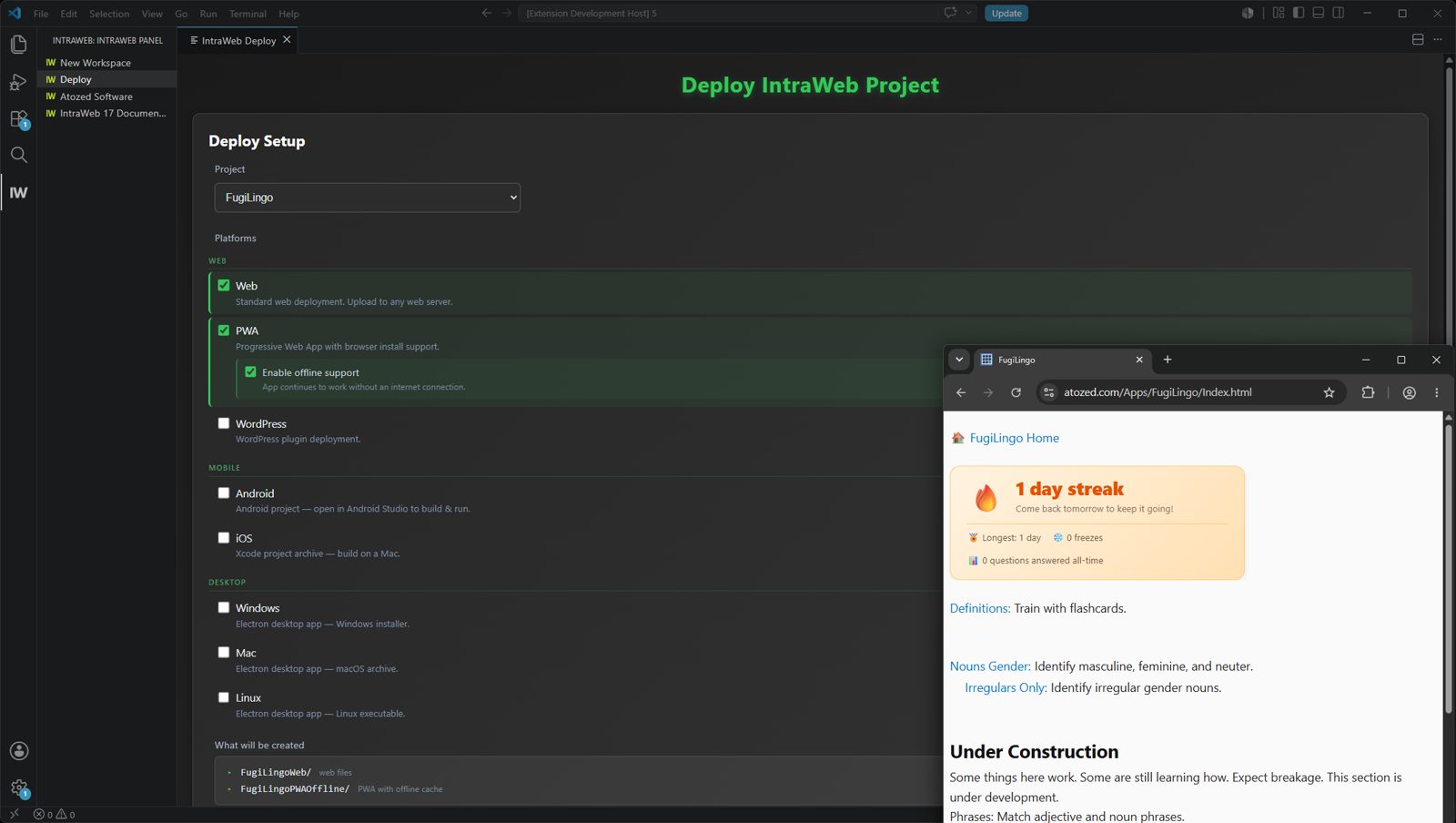
将 IntraWeb 集成到现有 WordPress 站点的最直观方式之一:在 IntraWeb 中设计区块,发布生成的文件,再通过内置的“自定义 HTML”区块把应用放进 WordPress。
从 IntraWeb 设计器到线上的 WordPress 页面
以可视化方式创建区块,发布生成的文件,再通过原生的“自定义 HTML”区块把运行中的 IntraWeb 应用嵌入 WordPress。
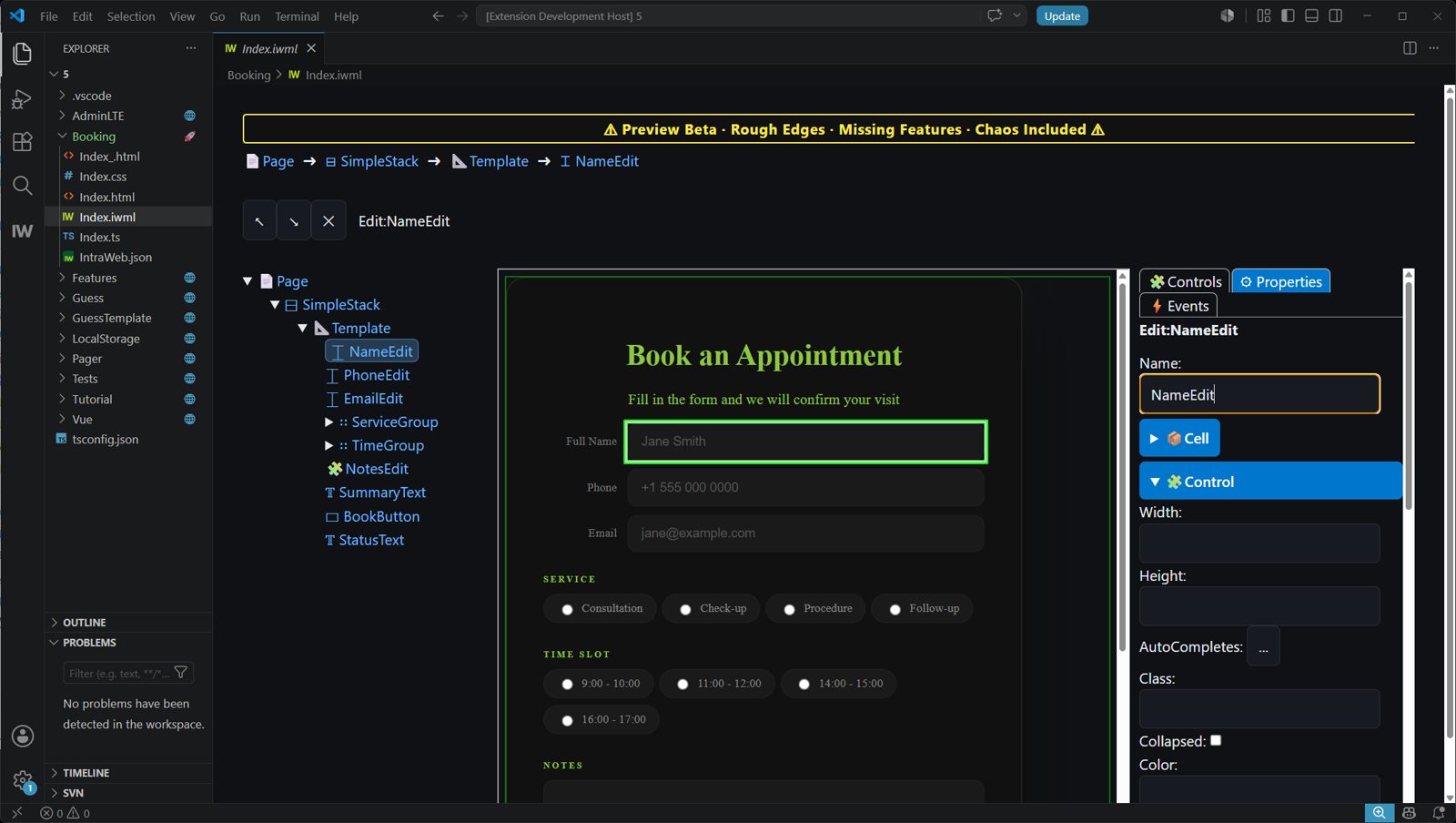
下面以一个预订板块为例来演示设计并发布 IntraWeb 区块
在 IntraWeb 设计器中以可视化方式构建界面,然后把生成的 HTML、CSS、JavaScript 和配置文件发布到服务器。本例中的区块是一个可以保存提交数据的预订表单。
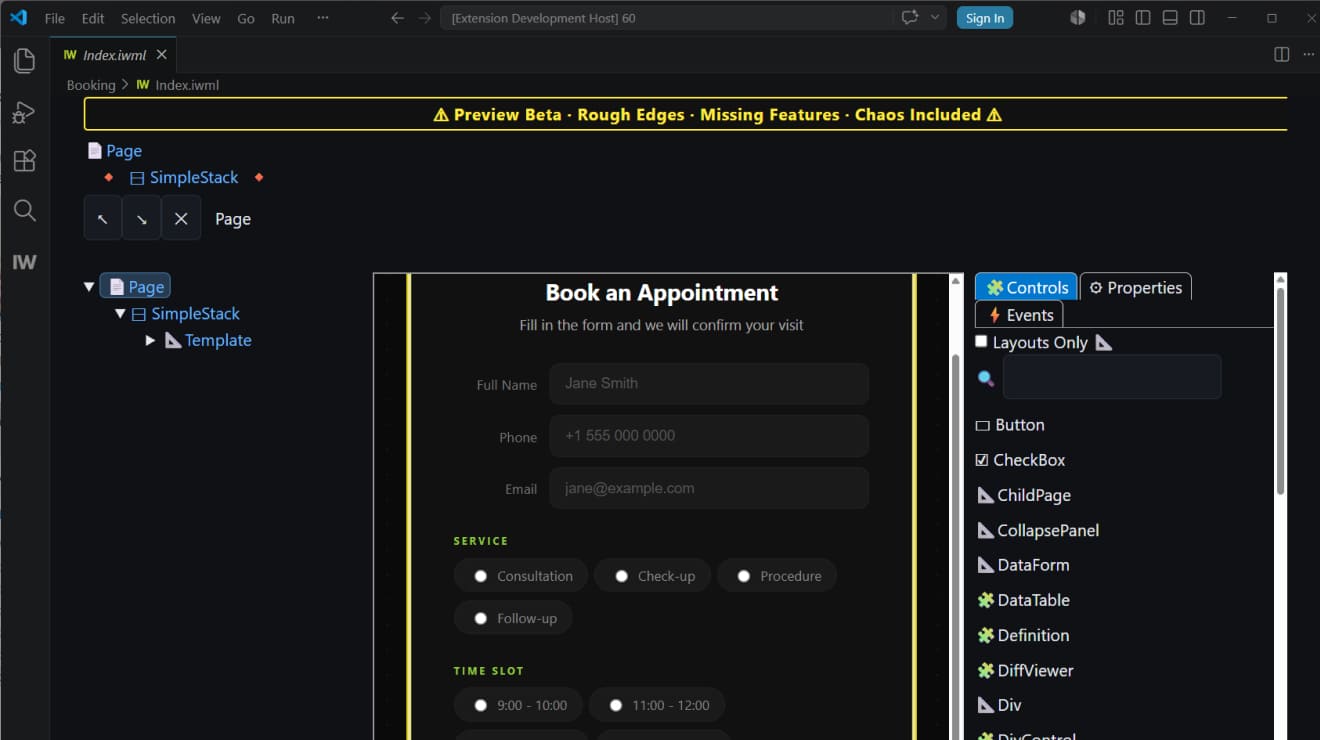 IntraWeb 设计器
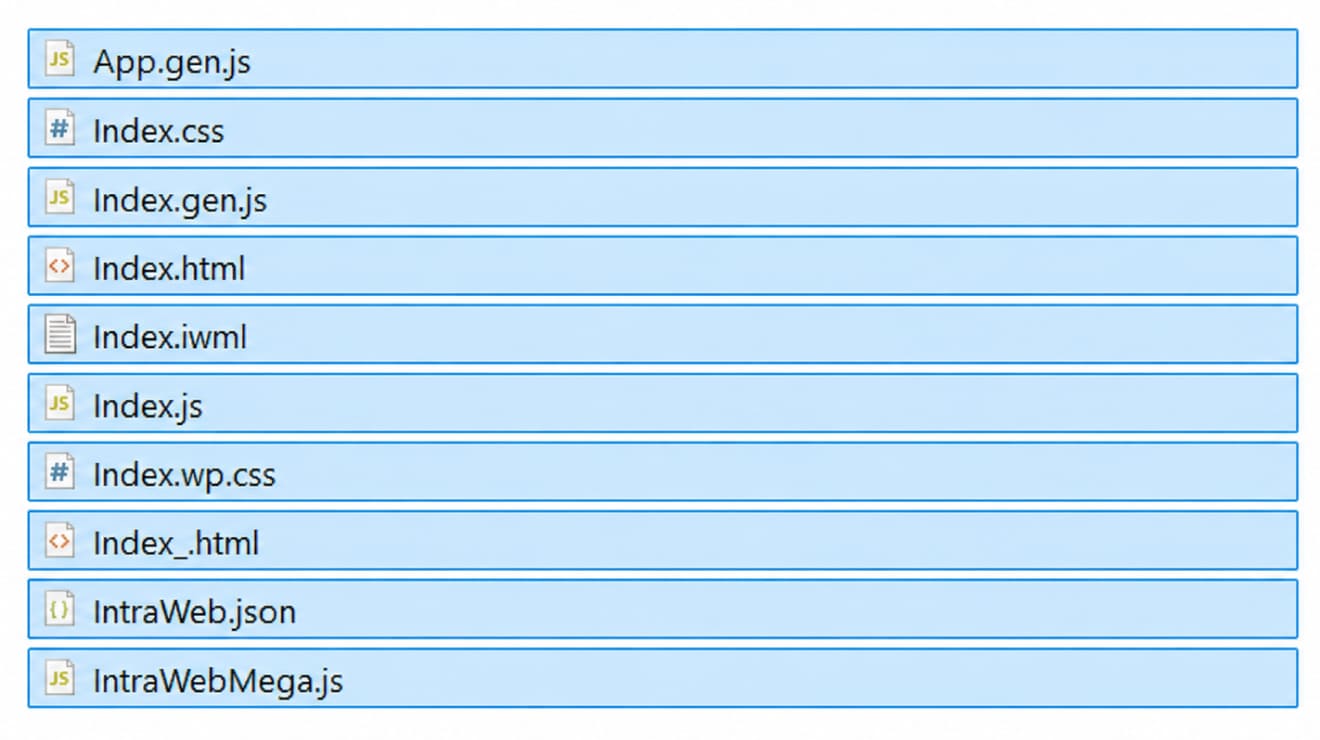 已发布的项目文件
添加自定义 HTML 并连接应用
在 WordPress 中,把内置的“自定义 HTML”区块添加到 IntraWeb 应用要出现的位置,然后粘贴一小段代码来加载已发布的应用。
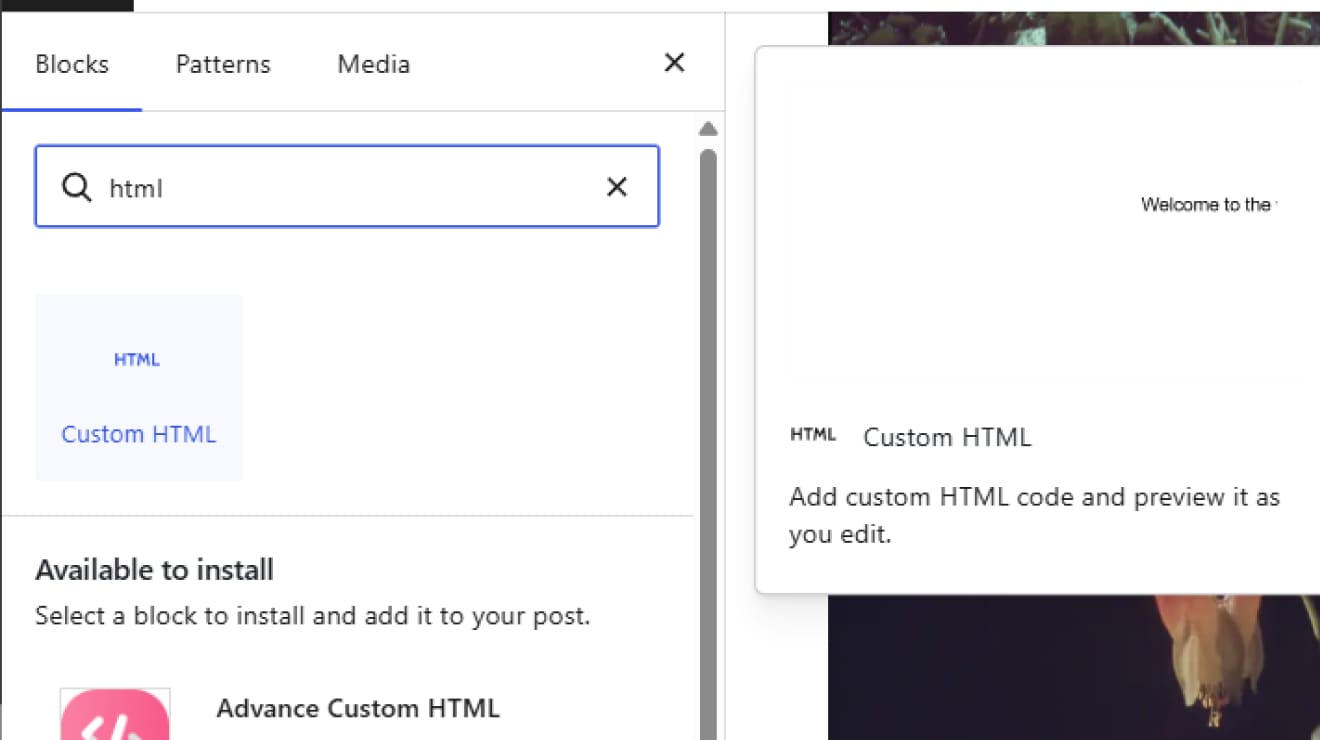 WordPress 自定义 HTML
 连接区块
连接区块
IntraWeb 表单已在 WordPress 中上线
表单会作为一个普通的 WordPress 页面板块内嵌显示。页面布局由 WordPress 负责,而 IntraWeb 让应用逻辑保持干净、独立,并始终由开发者掌控。

三十多年的 Web 工程实践——从最早的商业工具到今天的 IntraWeb
Atozed Software: 名副其实的 Web 先驱
我们早在
网络变“酷”之前就已入场
1994 年,浏览器还很原始,JavaScript 也尚未诞生。当全世界还在摸索拨号上网时,Chad Z. 就已经在发售全球首批商业 Web 开发工具了。早在 ASP、PHP 出现之前,也早在框架之争开始之前,我们就在连接业务逻辑与互联网。
Internet Application
Gateway
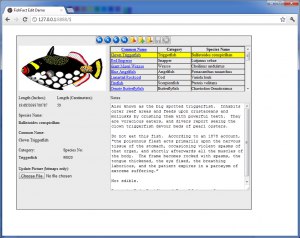
这张颗粒感十足的截图是一段历史的见证,记录了 Internet Application Gateway(IAG)的诞生,它是 IntraWeb 的前身。当时大多数动态系统只是直接吐出 HTML 字符串的原始代码,而 IAG 充当了业务逻辑与 HTTP 之间的网关层。
30 多年的工程积淀
从 90 年代中期的 IAG、1996 年的 Web Solution Builder,到今天的 IntraWeb,我们的历史是一条延续不断的工程严谨之路。我们不追逐潮流,因为我们深谙根基。
三十多年的 Web 工程实践——从最早的商业工具到今天的 IntraWeb
Atozed Software: 名副其实的 Web 先驱
我们早在网络变“酷”之前就已入场
1994 年,浏览器还很原始,JavaScript 也尚未诞生。当全世界还在摸索拨号上网时,Chad Z. 就已经在发售全球首批商业 Web 开发工具了。早在 ASP、PHP 出现之前,也早在框架之争开始之前,我们就在连接业务逻辑与互联网。
Internet Application Gateway
这张颗粒感十足的截图是一段历史的见证,记录了 Internet Application Gateway(IAG)的诞生,它是 IntraWeb 的前身。当时大多数动态系统只是直接吐出 HTML 字符串的原始代码,而 IAG 充当了业务逻辑与 HTTP 之间的网关层。
30 多年的工程积淀
从 90 年代中期的 IAG、1996 年的 Web Solution Builder,到今天的 IntraWeb,我们的历史是一条延续不断的工程严谨之路。
成为 first 这样构建应用的人。
加入 IntraWeb 17 FE 公测。与工程团队直接沟通,正式发布后第一年免费使用 Studio 授权。坦诚的反馈,无需签署 NDA。