StringBuilder is a simplistic demo demonstrating how to use the System.Text.StringBuilder class from Delphi. This demo also serves as a quick start example for using CrossTalk.
Running StringBuilder
A window will appear like this:
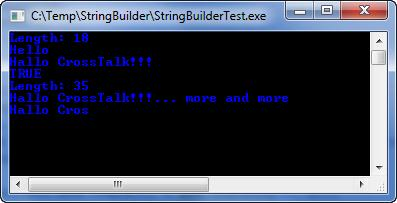
StringBuilder is a console application. However CrossTalk is fully usable in VCL Forms applications as well. StringBuilder is a simplistic demo designed as the first demo to be simple as possible. The code for StringBuilder is Delphi code, however closely mimics the equivalent C# or VB.NET code.
program StringBuilderTest;
{$APPTYPE CONSOLE}
uses
CTmscorlib,
SysUtils;
procedure TestStringBuilder;
var
xSB: StringBuilder;
xSB2: StringBuilder;
begin
xSB := StringBuilder.Create('Hello CrossTalk!!!'); try
WriteLn('Length: ' + IntToStr(xSB.Length));
WriteLn(xSB.Chars[0] + xSB.ToString(1, 4));
xSB.Chars[1] := 'a';
WriteLn(xSB.ToString);
xSB.Append('... more');
xSB2 := xSB.Append(' and more');
WriteLn(xSB = xSB2); // True, because Append returns Self
WriteLn('Length: ' + IntToStr(xSB2.Length));
WriteLn(xSB.ToString);
xSB.Length := 10;
WriteLn(xSB.ToString);
ReadLn;
finally xSB.Free; end;
end;
begin
try
TestStringBuilder;
except
on E:Exception do
Writeln(E.Classname, ': ', E.Message);
end;
end.